HTTP/2 and HTTP/3 Explained - AlexandreHTRB Blog
Let's take a friendly, chronological journey through the evolution of HTTP, the protocol that powers the web! 🌐 We'll highlight the key changes, explain technical terms in simple language, and quote the most impressive statements (translated to English if needed). Let's dive in!
The Birth of the Web: Early 1990s
Tim Berners-Lee and his team at CERN laid the foundation for the World Wide Web by defining four essential building blocks:
- A document format for hypertext (HTML)
- A data transmission protocol (HTTP)
- A web browser to view hypertext (the first browser, WorldWideWeb)
- A server to transmit the data (an early version of httpd)
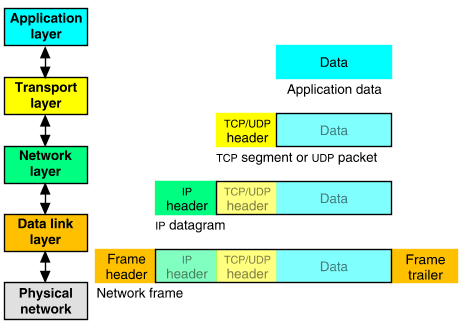
HTTP was designed to use the existing TCP/IP protocols for data transport, specifically operating at the application layer.
HTTP/0.9: The Very First Draft
HTTP/0.9 was extremely simple:
- Only the
GETmethod existed. - No headers or status codes.
- Only HTML as the data format.
- Messages were plain ASCII text.
Example request:
GET /mypage.html
Example response:
<html>
  A very simple HTML page
</html>
HTTP/1.0: The Modern Structure Emerges
With HTTP/1.0, the protocol gained its familiar structure:
- New methods:
HEADandPOST - MIME types (to describe content types)
- Status codes (like 200 OK, 404 Not Found)
- Protocol versioning
Example request:
GET /mypage.html HTTP/1.0
User-Agent: NCSA_Mosaic/2.0 (Windows 3.1)
Example response:
200 OK
Date: Tue, 15 Nov 1994 08:12:31 GMT
Server: CERN/3.0 libwww/2.17
Content-Type: text/html

<HTML>
A page with an image
  <IMG SRC="/myimage.gif">
</HTML>
HTTP/1.1: Efficiency and Flexibility (1997)
HTTP/1.1 brought several important improvements:
-
Persistent TCP connections (keep-alive):
"In the previous version, a new TCP connection was opened for each request and closed after the response."
Now, connections could be reused, saving resources. -
Hostheader:
"Allowing more than one server under the same IP." -
Header conventions for encoding, cache, language, and MIME type.
Example request:
GET /api/fruit/orange HTTP/1.1
Host: www.fruityvice.com
Accept-Encoding: gzip, deflate, br
Example response:
HTTP/1.1 200 OK
Server: nginx/1.16.1
Date: Sun, 10 Mar 2024 20:44:25 GMT
Transfer-Encoding: chunked
Connection: keep-alive
...
Content-Type: application/json
Expires: 0

{"name":"Orange","id":2,"family":"Rutaceae", ... }
Key point:
"In HTTP/1.1, two requests cannot ride together the same TCP connection - it is necessary that the first one ends for the subsequent to begin. This is called head-of-line blocking."
HTTP/2: Multiplexing and Speed (2015)
HTTP/2 was a major leap, based on Google's SPDY project. Its main features:
-
Multiplexing:
"Many messages in a single TCP packet."
This means multiple requests and responses can be sent at the same time over one connection. -
Binary format:
Messages are no longer plain text, but binary, making them faster to process. -
HPACK compression:
Headers are compressed to save bandwidth.
Head-of-line blocking solved (at the HTTP level):
"With HTTP/2, this problem is solved with streams, each stream corresponds to a message. Many streams can be interleaved in a single TCP packet. If a stream can't emit its data for some reason, other streams can take its place in the TCP packet."
How it works:
- HTTP/2 splits messages into frames.
- Each frame has a type, stream ID, and length.
- Frames from different streams can be mixed in the same TCP packet.
Visual:
Imagine colored envelopes (frames) from different conversations (streams) all packed together in a single box (TCP packet) 📦.
HTTP/3: QUIC and the Next Generation
HTTP/3 is built on a new transport protocol called QUIC (by Google, 2012), which uses UDP instead of TCP.
Why QUIC/UDP?
- Faster connection setup:
"Fewer packet roundtrips to establish connection and TLS authentication." - Better resilience to packet loss:
"More resilient connections regarding packet losses." - Solves head-of-line blocking at the transport layer:
"To solve TCP's head-of-line blocking, QUIC decided to use UDP for its transport protocol, because UDP does not care for guarantees of arrival."
Key difference:
"With TCP, subsequent packets cannot be sent until the lost packet successfully arrives to the destination."
"With QUIC, the responsibility of data integrity... is moved in QUIC to the application layer, and the frames of a message can arrive out of order, without blocking unrelated streams."
TLS (encryption) improvement:
- With TCP, all data must arrive before decryption.
- With QUIC, each packet is encrypted and decrypted individually, so you don't have to wait for all packets.
Summary Table:
| Feature | HTTP/1.1 | HTTP/2 | HTTP/3 |
|---|---|---|---|
| Transport protocol | TCP | TCP | UDP (QUIC) |
| Head-of-line block | HTTP/TCP/TLS | TCP/TLS | None |
| Message format | ASCII text | Binary | Binary |
| Header compression | None | HPACK | QPACK |
| Roundtrips before start | 3 (TCP+TLS1.2) | 2 (TCP+TLS1.3) | 0 (UDP+TLS1.3 0-RTT) |
| Connection ID | IP+port | IP+port | Connection ID |
| Cryptography | Optional, whole message | Optional, whole message | Embedded TLS 1.3, per packet |
Note:
"QUIC's connection ID can be used for fingerprinting, posing a risk to user privacy, according to a research."
Which is the Best Version?
"The two best versions currently are HTTP/2 and HTTP/3."
-
HTTP/3 is great for unstable connections (like mobile or satellite), thanks to QUIC's resilience and independence between streams.
-
However:
"HTTP/3 has performance penalties, mainly for 1) the UDP protocol wasn't optimized by routers and operating systems over the last decades due to its low usage, making it comparatively slower than TCP; and 2) the packet-by-packet cryptography used by QUIC requires a greater number of mathematical operations, becoming less efficient than the entire message cryptography used in TCP." -
Also:
"UDP protocol is restricted in some networks to protect against attacks like UDP flood attack and DNS amplification attack." -
On stable connections, HTTP/2 often performs better than HTTP/3.
Fun fact:
To avoid head-of-line blocking in HTTP/1.x, browsers often open multiple TCP connections in parallel.
"In scenarios with many heavy parallel requests and responses, this technique may make HTTP/1.x offer a better throughput than HTTP/2 or HTTP/3, however, it is a less efficient way to solve the problem."
Best practice:
"Generally speaking, it's recommended to run compatibility and performance tests to determine which version is the most appropriate, and furthermore, a server can accept both HTTP/2 and HTTP/3 connections, leaving to the client the decision of which version to use."
Final Recommendation
"I recommend Pororoca (made by myself 🙂)."
Key Takeaways
- HTTP has evolved from a simple, text-based protocol to a fast, multiplexed, and secure system.
- HTTP/2 and HTTP/3 solve many of the performance and efficiency issues of earlier versions, but each has its own strengths and trade-offs.
- Always test and choose the protocol that best fits your network and application needs!
Further Reading
- MDN - Evolution of HTTP
- Web Performance Calendar - Head-of-Line Blocking in QUIC and HTTP/3: The Details (recommended reading)
- Cloudflare - Introducing Zero Round Trip Time Resumption (0-RTT)
- A QUIC Look at Web Tracking (PDF)
Hope this helps you understand the evolution and inner workings of HTTP/2 and HTTP/3! 🚀
Need a summary like this?
Get instant summaries with Harvest